At Hostropics.com, we recommend that you register multiple domains for your brand. By doing this, you provide protection to your online presence, which keeps possible competitors from using your name to create websites.
For example, imagine owning example.com. At the very least, you should consider registering example.net, example.org, example.biz, and example.co. These additional domains can all be redirected to example.com once they've been registered.
We'll show you how to forward a domain to another one in this tutorial.
1) Go to the hostropics.com Client Area by pressing the login button at the top of the page or by visiting https://www.hostropics.com/panel/clientarea.php and log in:

2) Select My Domains

3) Select the settings icon to the right of the domain that you would like to redirect.

4) Click on the DNS Management link in the left side menu under the "manage" tab

5) Under Record Type, select URL Redirect from the drop down. Under Address, type the address where you want to redirect.
In this example, we'll redirect myexample.com to example.com, so in the Address section, we typed https://example.com.
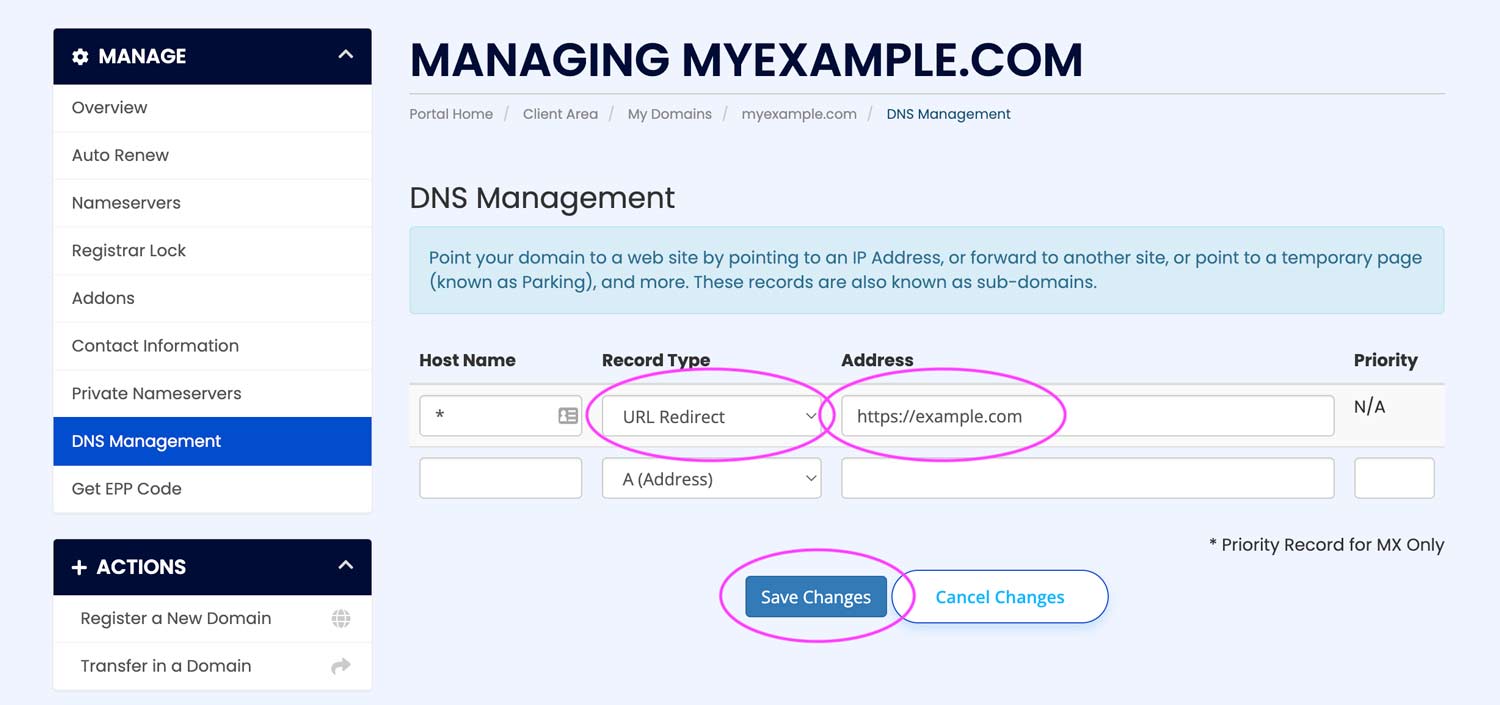
Click Save Changes (pictured above) after making sure there aren't any other records listed.
Congratulations! You've just redirected a domain.
